

















 Built with Flutter
Vacation Rental Script
Launch your vacation rental platform with the right solution.





Recognized by Clients, Verified by Real Reviews
Backed by over 9+ years of product development expertise, RentALL is the trusted choice for founders building vacation rental marketplace apps.
























Introducing our Vacation Rental Script
Launch your vacation rental app using our Vacation rental script, boasting the best UI and UX. Along with a robust, customizable platform, you'll receive comprehensive tech support, including white labeling, server installation, and more, all at no additional cost. Don't wait any longer, digitize your vacation rental business with us!
All the features, covered

Use advanced search filter
Apply filters like location, dates, time, guest count, home type, price range, and more to find suitable listings for the trip.

View listings on the map
Find all the available listings and their prices in the search location by accessing the map option on the search page.

Save favorite listings
Save favorite listings on the platform under the wishlist to quickly find the listings and book them at a later date.

View listing details
Access all information about any listing, such as its images, its location, the offered amenities, reviews, and more.

Inquire about the listing
Inquire about a listing before booking it by accessing the contact host option and sending the host a message.

View Itinerary
Access the itinerary with the booking details, including billing details, the trip date & time, the address, and such.

View booking receipt
Get a booking summary in the receipt, including location, timing, and billing information, with the option to print.

Cancel the booking
Cancel the bookings if the schedule changes and receive refunds according to the host's cancellation policy.

View past and upcoming bookings
Access all upcoming and previous booking details, such as status, host details, location, date and time, etc.

Message the host
Exchange messages with the hosts through the inbox to clarify any queries regarding the reservations.

Manage user profile
Set and manage profile details and also verify the profile using email, Google, and documents.

Choose payment method
Pay for the reservation using the available payment methods, which include credit or debit cards and PayPal.

Choose preferred language
Access the platform in multiple languages from the available options, including English, French, Spanish, and more.

Use preferred payment options
Use the preferred payment method from credit or debit cards and PayPal to pay for the bookings.

Manage all listings
Access and manage all listings in different groupings such as complete, unfinished, and unlisted.

List the amenities
Specify the amenities that come along with the listing to make the listing more desirable for the guests.

Set house rules
Establish home rules on all listings to ensure that the guests who reserve the listing maintain it in good condition.

Set the price
Specify the currency, base price, cleaning fee, as well as the tax and discount percentages when setting the listing price.

Set up guest discounts
Offer weekly and monthly discounts by specifying discount percentages to encourage guests to make longer reservations.

Set and track listing availability
Manage a listing's availability dates by blocking unavailable dates, and even setting special prices for specific dates.

Allow instant booking
Enable the 'Instant book' option so that guests can make reservations without waiting for approval.

View all bookings
Access all upcoming and past reservations and filter through them by dates, specific listings, or booking orders.

Cancel bookings
Cancel reservations on any listing if necessary and the guest will receive a refund up to the platform's policies.

Message the renter
Exchange messages with the guest through the inbox to clarify any queries regarding the reservations.

Manage ratings and reviews
Add reviews and ratings for guests of completed bookings, and access ratings and reviews left by the guests.

Manage payout options
Add and manage multiple payout accounts, and set one as the default account to receive reservation payouts.

View transaction history
View completed and upcoming transactions, as well as gross earnings generated through the platform.

Set platform currency
Choose the preferred currency from the many available alternatives, including USD, EUR, JPY, AUD, and others.

Use a light or dark theme
Access the platform either in light mode or dark mode, or set it to match the default theme of the device.

Get platform overview
View platform information, such as the users, listings, and reservation counts, updated daily, monthly, and overall.

Manage site settings
Manage your site settings, like the logos, the site name, site title, social media links, App Store & Play Store URLs, and more.

Manage site configurations
Control the configuration settings of your site, including the settings of Stripe, SMTP, Twilio, PayPal, Google, and more.

Add admins for help
Create sub-admin users and delegate administrative tasks to them to help you effectively manage the platform.

Manage users
Access and manage user information, permit or prohibit the users from the site, or even delete them entirely.

Manage listings
Monitor all the listings on your site, edit their details, mark them as recommended for renters, or even delete them.

Manage reservations
View all reservation details on your site, access cancellation options, and handle any necessary payouts or refunds.

Manage inquiry
Access all the booking inquiries made by the guests about the listings and pre-approve them on behalf of the host.

Set up service fee
Set a flat fee or a percentage-based fee as the service fee charged to all the renters and hosts on all their bookings.

Manage payout
Access the details and status of the auto-processed payouts, and hold the payout for any booking if required.
Manage payment methods
Set the availability status of the payment gateways offered to users, such as the PayPal and Stripe payment gateways.

Manage currency
Set your platform's base currency and manage the availability of all currency options offered to users.

View user reviews
Access all the ratings and reviews left by renters and hosts about their booking experience and edit them if needed.

Add reviews & ratings
Add ratings and reviews for any listings on the platform, and edit or delete these reviews as needed.

Verify user documents
View the documents submitted by users and verify their identities to decide whether to approve or reject them.

View user messages
View the messages exchanged between renters and hosts on all platform bookings to ensure transparency.

View user reports
Access all the reports made by users to quickly address any issues with the functionality of your platform.

Establish cancellation policy
Define the terms of the cancellation policies available for users, which include flexible, moderate, and strict options.

Manage search settings
Set and adjust your platform's search filter settings, such as the minimum and maximum price range and currency.

Manage homepage
Manage the appearance of your platform's homepage, including its banner caption, image banner, footer block, etc.

Manage webpages
Manage the contents of the webpages on your site, including the 'Why host page' and 'Why become host page.'

Add more webpages
Create web pages on your site and control their contents by editing, setting their status, or deleting them.

Manage static pages
Set and manage the contents of your site's static pages, such as 'About Us', 'Terms & Privacy', 'Help', and more.

Multi-language support
Access the panel in your chosen language from options including English, French, Spanish, Arabic, and more.

Request a free guidebook
And know the complete workflow features and technology used in our Vacation rental script.
Ready to experience the demo?
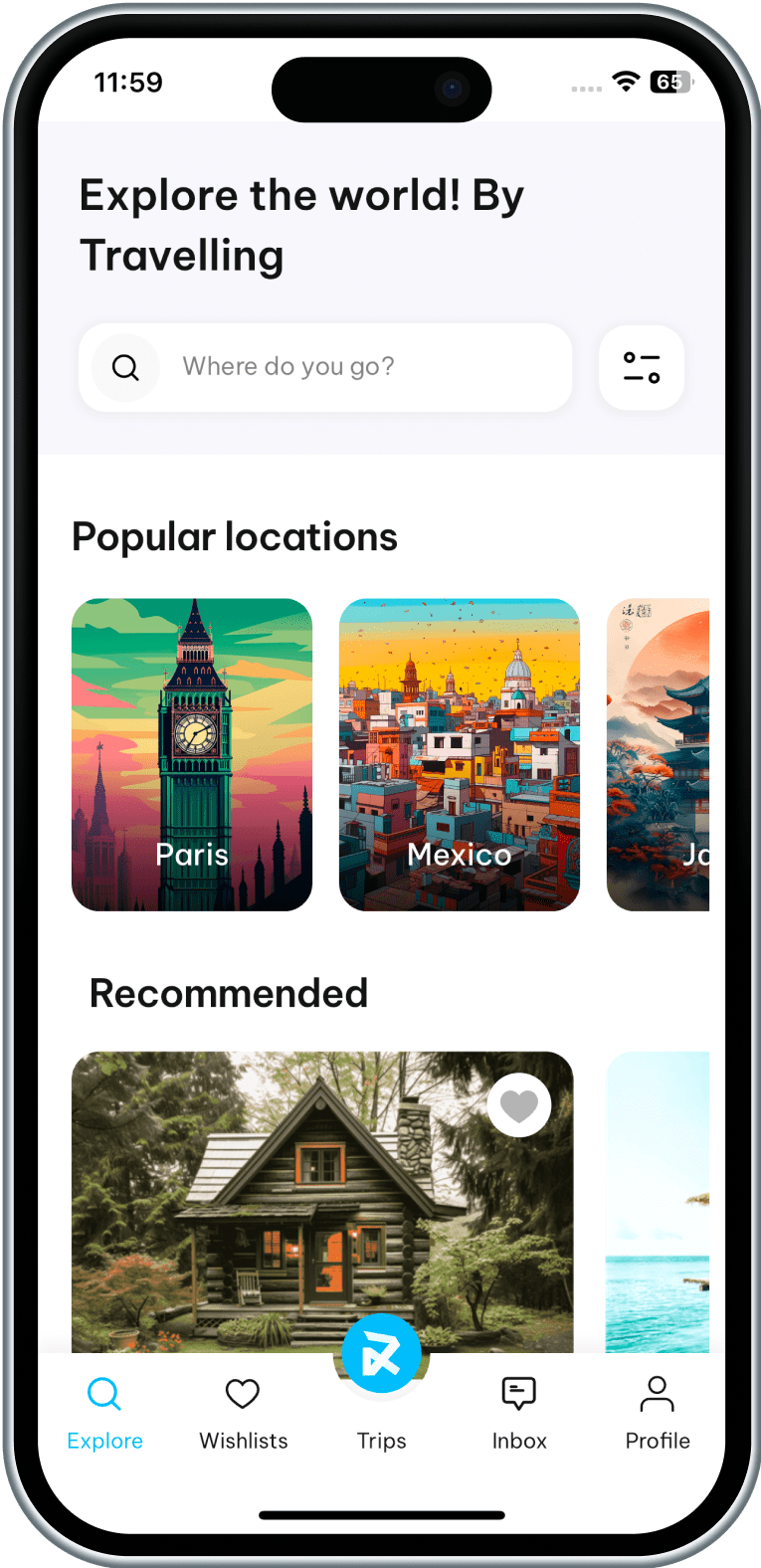
Mobile app
Explore the mobile apps on both platforms
Web panel
Check out the web panel of users and admin


Book a personalized demo with our Marketplace Expert
What can you expect in this call?
Walk you through the full flow for the guest app, the host panel, and the admin panel in your vacation rental script
Explore the must-have features that help vacation rental platforms launch faster.
Show you how our vacation rental script can be customized for your property categories and rental regions.
Discuss custom integrations such as payment gateways, booking calendars, and third-party services.
Explain how the vacation rental script stays compliant with App Store and Play Store guidelines.
Why quality matters more than price!
Think beyond “Minimum Viable Product”
Go live with the solution that supports 100% scalability and beyond MVP.
Own the 100% source code, without encryption.
Built with Flutter to scale effortlessly.
Get unlimited updates at no extra cost.
Experience the intuitive UI and UX.
Enjoy all features even for a basic package.
Get the industry’s best post-sale tech support.
Choose the right plan

Sale! $999
Any Product for Just $999 Limited to the First 20 Customers!
Startup Pro
- Single domain license
- Tech support for 3 months
- Updates for 6 months
Advanced Pro
- Multi-domain license
- Tech support for 6 months
- Unlimited updates
All these supports, for free

White-labeling
Let us rebrand the Vacation rental script with free white-labeling.

Server installation
We'll install the required package and the script on the server.

Lifetime updates
Get lifetime platform updates for the vacation rental solution you purchase.

Bug-fixes
Get the free bug fixes support for 3 months, with an option to extend to 6 months.
How our end-to-end process looks?
Customize
Choose white labeling or opt for additional customization for the Vacation rental script.
Test
Our quality analyst meticulously tests the platform to ensure a bug-free experience.
Launch
Once tested, your vacation rental solution is ready to be available for the users.
Build to perform and scale
 Apollo GraphQL
 Apollo GraphQL
 Node.js
 Node.js
 React
React React
 Express
 Express
 GraphQL
 GraphQL
 Bootstrap
 Bootstrap
 Sequelize
 Sequelize
 Flutter
 Flutter
 GetX
GetX GetX
 Dart
Dart Dart
 Lottie
 Lottie
 Firebase
 Firebase
Their love is growing day by day
“As we know, we're in production, we're in live, it's because of you and because of us, and because of a great collaboration. So we are proud to make such a great product with you, we want to thank you for your time and enthusiasm. We always have a lot of difficulties and challenges, and you always do your best and find great solutions for us. It is really nice. We appreciate it. It's only the beginning.”
- Oleg, Porto



“I was planning for a small project with a limited budget; my good luck drove me to RadicalStart. Amazing how they are, very nice, professional, perfection-oriented people, and well-organized. All I had to do was tell them what I wanted and they brought my dreams to reality with the most exceptional results. All I can say now is, my work and my projects, are gonna be exceptional.”
- Asaad, SKYNORTH


“My partner and I had a great idea for business. As it turns out, you guys had that product we wanted and needed. We got to you by a friend's recommendation and we instantly clicked and we were very happy that you could provide us the tool that we wanted and needed for our business. We had a great team and they're helping us a lot. They have a very good response.”
- Jorge, Eventasis


“I know during this time, RadicalStart is showing exceptional adaptability to market changes; always maintaining the commitment to the quality. We want to thank everyone who is a part of RadicalStart for their work and dedication. Without your effort and passion, this achievement wouldn't be possible. On behalf of all of us at Trineo app, we express our deep gratitude for your outstanding product and service.”
- Michael Leppe, Trineo app


“I started my project with you guys this year. I want to say this has been a very amazing experience and you are all very professional, and very talented, and you have helped me to design my app the way I want with so many customization. Thank you so much. I wish you to become the most successful company in India and the world. Thanks, Gowtham for your amazing ongoing Support.”
- Usman, Cheetah


We Are Here to Answer Your Questions
Know more about our product
The vacation rental script is a pre-developed web and mobile app solution that helps entrepreneurs launch their vacation rental platform quickly and effortlessly.
Since it is a pre-built solution, it is cost-effective and can be launched quickly.
Users sign up, browse properties with advanced search filters, book, message hosts, and track reservations.
Hosts create accounts, list properties, set pricing, manage bookings, and communicate with guests via in-app messaging. After each stay, both guests and hosts can rate the stay experience.
Payments are processed automatically, with hosts receiving earnings from the admin.
The admin manages the platform, oversees listings and users, and collects commissions for every reservation.
That means the code is not encrypted. You can customize the code of the Vacation rental script to incorporate new features, functionality, and workflow.
It is 100% customizable to develop any kind of rental marketplace.
However, once the source code files are tampered with(after you modify the source code), we will not be able to provide any technical support.
- Web app for users
- Mobile app for users (Android and iOS)
- Admin web panel
- Free tech support (white-labeling/Rebranding, server installation, free bug fixes, and product updates)
Based on the plan you purchase, the period for bug fixes and product updates will change.
Please refer to Apple App Store Guidelines: https://developer.apple.com/app-store/review/guidelines/#design
The Apple App Store has a strict approval process and expects each app to offer a unique design and functionality.
To ensure smooth and hassle-free approval, we highly recommend customizing your mobile app with distinctive features and functionalities.
For customization, you can either hire our team to work on the unique modifications or get it done with your own team and then proceed with the app submission.
This is to avoid rejection of the apps on the Apple App Store. (Policy #4.3 - Design Regulations.)
Regardless of your choice, we will provide you with 100% of the source code for both the website and mobile apps and give you full flexibility and control.
If you're eligible for unlimited updates, you'll receive the updated source code whenever we release product updates, including new features and bug fixes.
While these updates are free, please note that any website reinstallation, mobile app reinstallation, or app resubmission will incur additional costs.
If no custom changes are made, we can simply replace the files with the new version.
If we have worked on any custom changes, we need to compare the code and implement the changes.
Note: Updates are completely free, but we may charge you for the hours spent applying the upgrades.
If the customization was done by you, we will only provide updated source code files and will not be able to provide support for tampered source code files.
For the base plan, you receive a “6 months free update,” and for the premium plan, the update is unlimited, for a lifetime.
- White-labeling/Rebranding for website only
- Website installation
- Free bug fixes
- Product updates
- Issues in your local machine installation
- Reinstallation of the script
- Issues in Git due to not following the instruction
- Issues in modified code or if customization is done by you/your team
- Any custom changes that would need additional development efforts
The free technical support period will begin from the date of purchase.
Following the purchase, you can connect with our technical support team only by email. They will not be available for calls.
It would take around 24 to 48 hours to respond during business days based on the queue.
You can hire our team for additional support. It will be under additional cost.
For Website:
- Color changes
- Font changes
- Favicon changes
- Content changes
We will install the script on your server free of cost for the first time. However, additional installation will be under additional costs.
We prefer Let's Encrypt SSL (it is free and offers automated renewal and open certificate authority).
If you wish to install another SSL provider, there will be an additional cost for the SSL installation.
Yes, it is applicable to every plan. However, the time period for the support changes.
- 3 months for the starting package
- 6 months for the higher package
We highly recommend AWS or DigitalOcean and also it will work fine on any Ubuntu-based hosting servers.
Here is the minimum server requirement,
- Operating System - Ubuntu 24.04
- Storage - 50GB (Should be expandable)
- RAM - 4GB (Should be expandable)
- MySQL - Version 8.0
- SSH with root user access
Note: The server should be plain. It should not have any configuration like Apache, any Database, etc.
A single-domain license can only be used for one business in a single domain. For example mybusiness.com.
Multi-domain licenses can be used for any number of businesses on multiple domains. For example mybusiness1.com, mybusiness2.com, etc.
We always stay updated!
Released date: Sep 07, 2026
- Bug fixes and performance improvements.
Released date: July 01, 2026
- Bug fixes and performance improvements
Released date: Jun 28, 2026
- Core Technology Update: The mobile application has been migrated to Flutter, providing a single codebase for both iOS and Android to enhance consistency, scalability, and development efficiency.
AI-Powered Enhancements
For Hosts
- AI Title & Description - AI-assisted content generation enables Hosts to create compelling, optimized listing titles and descriptions with minimal effort.
- AI Market Price Suggestion - Provides AI-driven pricing recommendations to help Hosts determine competitive nightly rates based on market trends and comparable listings.
For Guests
- AI Message Generation - AI-powered messaging helps Guests generate clear and well-structured messages, simplifying communication with Hosts during the booking process.
- Complete Multilingual Support (Web & Mobile): Administrators can configure listing attributes, homepage content, and Whyhost page content in multiple languages, ensuring platform content is displayed in each Guest's preferred language throughout the booking journey.
- Multi-language Notifications & Alerts: Multilingual support has been introduced for push notifications and in-app toaster messages, enabling users to receive notifications and updates in their preferred language.
- Centralized Multilingual Static Content: Centralized multilingual static content management is now available through the Admin Panel, enabling administrators to localize static content with instant, platform-wide updates.
- Dynamic Email Content Management: Dynamic email content management has been introduced through the Admin Panel, enabling instant email template updates without requiring code changes.
- Service Plan Introduction: A new service plan has been introduced for Hosts and Guests, offering reduced service fees, access to AI-powered features, and additional platform benefits.
- Coupon Code: Coupon code support has been introduced, allowing Guests to apply discounts during checkout and save on their bookings.
- UI Enhancements: Minor UI enhancements have been introduced to deliver a smoother and more intuitive user experience.
- Library Upgrades: Core libraries have been updated to the latest versions, delivering improved security, performance, stability, and platform efficiency.
- Bug Fixes & Improvements: Minor issues identified during testing have been resolved, along with performance enhancements, to deliver a smoother and more reliable user experience.
Released date: July 08, 2025
V3.8.1
- Bug fixes.
V3.8
- Introduced a document verification feature within the mobile application to enhance user authentication and security.
- Revamped the inbox page for better user experience.
- Introduced a new transaction history page under the host menu, providing detailed visibility into reservation payouts.
- Upgraded to the latest libraries to ensure improved performance, security, and compatibility.
- Bug fixes and performance improvements.
Released date: Apr 04, 2025
- Bug fixes and performance improvements